
today’s fast-paced digital world, having immediate access to your financial information is crucial. You might find yourself in a situation where you need to make an online payment or fill out a form that requires your debit card details, but your physical card is not within reach. Misplacing your wallet or simply being away from home can create a moment of panic. Fortunately, most modern banking services have anticipated these needs, providing secure online platforms where you can retrieve essential information without compromising your account’s safety.
Central Bank of India offers a robust and secure solution through its “Cent eeZ” net banking portal. This service allows account holders to manage their finances, from checking balances to viewing specific card details, right from their computer or smartphone. If you are a Central Bank of India customer, you no longer need to search for your physical card to find its number or expiry date. By following a few simple and secure steps, you can access this information instantly through your online banking dashboard.
Table of Contents
Step by Step guide – Check your Central Bank of india Debit Card Details Online on Cent eeZ net banking
This guide provides a straightforward walkthrough to help you locate your full debit card number and its expiry date using the Central Bank of India’s official net banking website. The process is designed with multiple layers of security to ensure that only you can access your sensitive information.
Before you begin, make sure you have the following prerequisites in place: an active account with the Central Bank of India, your net banking User ID and login password, and access to the mobile number registered with the bank to receive the One-Time Password (OTP) for verification. If you have not yet activated your net banking, you will need to complete the registration process first.
Step 1: Visit the Official Central Bank of India Website

First, open your web browser and navigate to the official Central Bank of India net banking login page. Select the Cent eeZ option and click on the Proceed button
Step 2: Enter Your User ID and Captcha

On the “Login to Personal Banking” page, enter your CIF or User ID in the designated field. Next, carefully type the characters you see in the Captcha image into the box below it and click the “Login” button.
Step 3: Provide Your Login Password
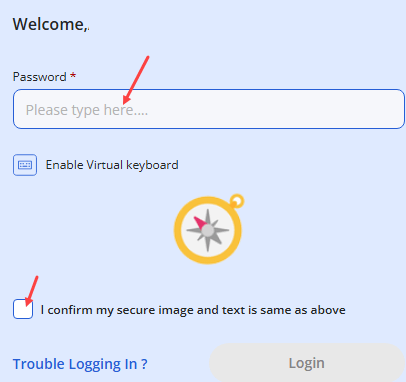
You will be directed to the next page where you need to enter your net banking password. Type your password carefully. For added security, you can use the virtual keyboard option. Once entered, click “Login”.
Step 4: Verify with a One-Time Password (OTP)
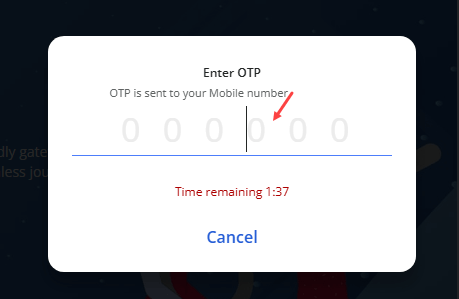
As a security measure, the bank will send a 6-digit OTP to your registered mobile number. Check your phone for the message, enter the OTP in the provided boxes on the screen, and submit it to proceed.
Step 5: Access Your Net Banking Dashboard
After successful authentication, you will land on your personal net banking dashboard. This is the main hub where you can see a summary of your accounts and access various banking services.
Step 6: Select the ‘Manage Debit Card’ Option

On the dashboard, locate the “My Savings A/C” section. Under your account summary, you will find several quick-link icons. Click on the icon labeled “Manage Debit Card“.
Step 7: Click ‘Show Details’ to Reveal Card Information

Under the image of your debit card, you will see a link that says “Show Details”. Click on it.
Step 7: Click ‘Show Details’ to Reveal Card Information
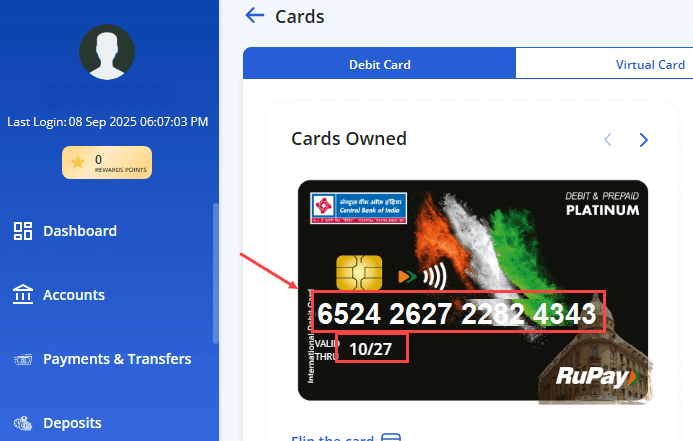
Once you click on Show Details, you need to authenticate using OTP. Once you submit the OTP, you can now check your Debit card number and expiry date on the card image.
Frequently Asked Questions (FAQ)
Q1: Is it safe to view my full debit card number online?
Yes, it is completely safe as long as you are using the official Central Bank of India net banking portal. The connection is encrypted, and the bank uses multi-factor authentication (password and OTP) to ensure that only the authorized account holder can access this information.
Q2: Can I also find my 3-digit CVV number using net banking?
No, for security reasons, banks do not display the CVV (Card Verification Value) number online. The CVV is only printed on the back of your physical card and is required for completing most online transactions.
Q3: What should I do if I have forgotten my net banking password?
If you have forgotten your password, you can use the “Trouble Logging In?” or a similar “Forgot Password” link on the login page. You will need to follow the on-screen instructions, which typically involve verification using your debit card details and an OTP sent to your registered mobile number.
Q4: What is the difference between Cent eeZ and the old net banking?
Cent eeZ is the name for Central Bank of India’s new and improved Omni-channel digital banking platform. It offers a more modern and unified experience across both net banking (on a browser) and mobile banking (on the app), replacing the older interface.
Final Words
Using the Central Bank of India’s net banking portal is a highly convenient and secure way to access your debit card details whenever you need them. By following the steps outlined above, you can retrieve your card number and expiry date in under a minute without needing the physical card.
Always remember to practice safe online banking habits. Never share your User ID, password, or OTPs with anyone. After you have finished your session, make sure to log out properly, especially if you are using a public or shared computer.
