
Keeping your debit card PIN secure is key to protecting your money and transactions. If you’ve lost track of your old PIN, feel like switching it up, or just got a new card and need to set one, you don’t have to trek to an ATM these days. Central Bank of India lets you handle it all right from their Cent eZ Net Banking site—super convenient and straightforward.
Using this online banking tool, you can whip up a new PIN or reset the old one without leaving your couch. You’ll just need your net banking login info, the mobile number tied to your account, and some basic details from your debit card. Here’s how to do it, broken down nice and simple.
Table of Contents
Steps to Create or Reset Your Debit Card PIN Online with Central Bank of India Net Banking (Cent eeZ)
It’s all done digitally, no fuss, and pretty quick. Stick to these steps, and you’ll have a fresh PIN in no time.
Step 1: Head to the Bank’s Website
Fire up your browser and go to the Central Bank of India’s main site. Spot the “Net Banking” section and click it. Pick “Personal Banking – Cent eeZ” and hit “Proceed” to get started.

Step 2: Sign Into Your Account
Punch in your CIF number or your usual Net Banking User ID. Fill out the captcha to prove you’re not a robot, then click “Login.” Put in your password, and you’re in your dashboard.

Step 3: Find the Debit Card Management Area
Once logged in, scan the main page for “Manage Debit Card.” If it’s not right there, click on the menu, head to “Cards,” and then “Debit Card” to locate it.

Step 4: Choose the PIN Setup Feature
In that debit card section, look for and select “Set PIN” to begin the process.

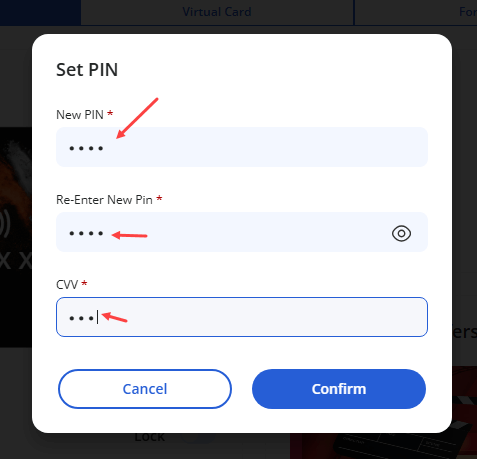
Step 5: Input Your New PIN and Card Info
Come up with a 4-digit PIN you want to use and type it in. Type it again in the next box to confirm it’s correct. Grab your debit card and enter the 3-digit CVV from the back. Hit “Confirm” when you’re good.
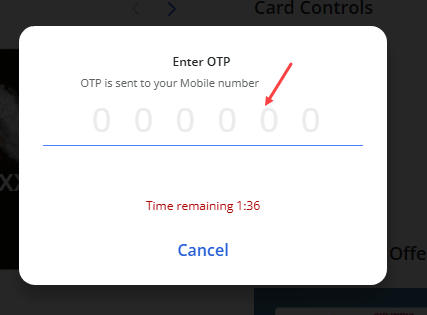
Step 6: Confirm with the One-Time Code
They’ll shoot an OTP straight to your registered phone. Enter that code on the page and submit it to verify.
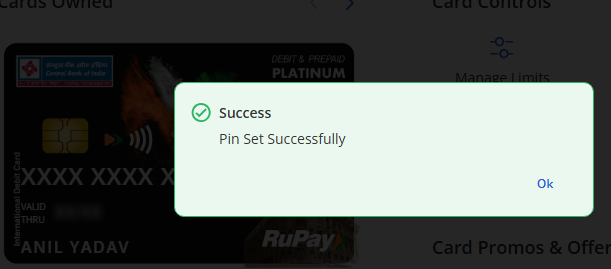
Step 7: Success Message Appears
After the OTP checks out, you’ll get a note saying your PIN has been set successfully.
Step 8: Give It Time to Activate
Hang tight—the new PIN usually kicks in after about 24 hours. Then you can start swiping or withdrawing at ATMs and stores.
Wrapping It Up
Honestly, sorting out your Central Bank of India debit card PIN online is a breeze now. Cent eZ Net Banking makes it secure and speedy, so forget about lining up at an ATM. You can knock this out in a few minutes and be ready to go the next day.
Quick FAQs on Central Bank of India Debit Card PINs
- Do I really not need to go to an ATM for this? Nope! Cent eZ Net Banking handles PIN creation or changes entirely online.
- How soon can I use the new PIN? It takes around 24 hours to activate, after which it’s good for ATMs or point-of-sale spots.
- What stuff do I need handy? Your net banking login and password, the phone number linked to your account, and your debit card’s CVV.
- Is this method secure? Totally—the bank’s site uses OTP verification and top-notch security to keep things safe.
- Am I allowed to tweak my PIN whenever? Sure thing. Just repeat these steps as often as you like to update it.
