
Are you looking to update your registered email ID in your ICICI Direct Demat account? With the All-in-One ICICI Direct app, the process is quick and hassle-free. Follow this step-by-step guide to update your email ID effortlessly.
Table of Contents
Steps to Change/Update Your ICICI Direct Registered Email ID
Updating your email ID in your ICICI Direct Demat account is a straightforward process. Whether you’ve changed your email or want to use a more active address, ICICI Direct makes it easy to update this information online. Follow these simple steps to update your registered email ID using the ICICI Direct All-in-One application.
Step 1: Login to the ICICI Direct All-in-One Application
Start by logging in to the ICICI Direct All-in-One app using your credentials. Once logged in, locate the Menu option at the bottom-right corner of the screen.

Step 2: Navigate to “At Your Service”
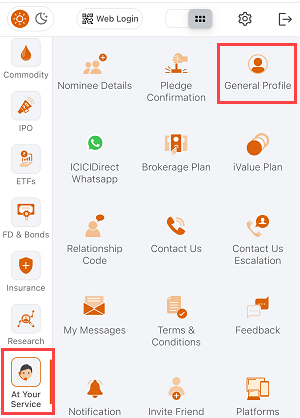
Tap on the Menu option, scroll down slightly, and select At Your Service. From the list of available options, choose General Profile.
Step 3: Enter Your New Email Address
In the next screen, you’ll see fields to update your email ID.
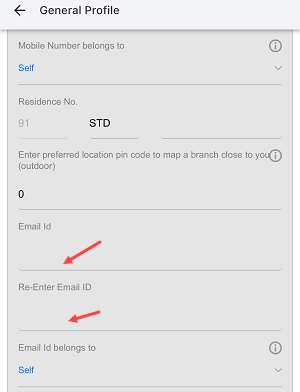
- Enter your new email address.
- Re-enter it to confirm the details.
Step 4: Update the Email Address
After filling in your new email details, tap the Update button.

Step 5: Aadhaar Verification
To ensure security, you’ll need to verify your identity using Aadhaar:
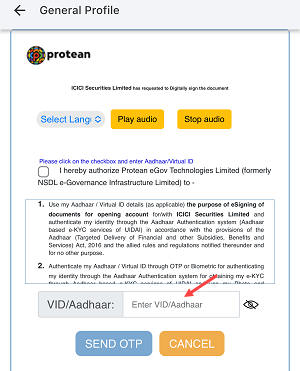
- Enter your Aadhaar card number.
- Tap Send OTP to receive a One-Time Password (OTP) on your Aadhaar-linked mobile number.
Step 6: Verify the OTP
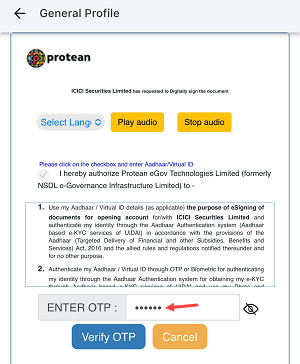
Enter the OTP you received and tap Verify OTP.
Step 7: Confirmation
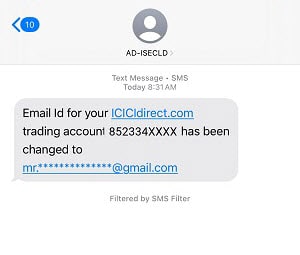
Once verified, your email ID will be successfully updated.
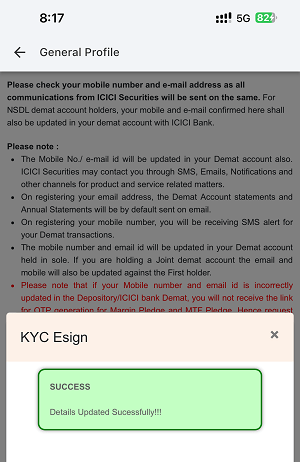
You’ll receive a confirmation SMS on your registered mobile number to notify you of the change.
Key Points to Remember
- Ensure your Aadhaar card is linked to your active mobile number for OTP verification.
- Double-check your new email address to avoid errors.
- Keep the ICICI Direct app updated to access the latest features and security updates.
Why Update Your Email ID in ICICI Direct?
Keeping your email ID updated ensures you don’t miss important updates, transaction statements, or alerts regarding your Demat account. A valid email ID is essential for seamless communication and account management.
By following these steps, you can easily update your ICICI Direct Demat account email ID online. This simple process ensures you stay connected and in control of your investments.
