
In today’s fast-paced world, convenience in banking is paramount. Bank of India (BOI) understands this need and offers a seamless WhatsApp Banking service that allows you to access essential banking functionalities, including checking your mini statement and account balance, directly from your smartphone. This guide will walk you through the simple steps to set up and use BOI’s WhatsApp Banking for checking your mini statement.
Table of Contents
Why Use BOI WhatsApp Banking?
BOI WhatsApp Banking offers several advantages:
- Convenience: Access banking services from anywhere, anytime.
- Speed: Get instant responses to your queries.
- 24/7 Availability: No more waiting for bank hours.
- Ease of Use: Simple, chat-based interface familiar to WhatsApp users.
- No Extra App: Utilise an app you already have on your phone.
Prerequisites for BOI WhatsApp Banking
Before you begin, ensure you have:
- An active WhatsApp account on your smartphone.
- Your mobile number is registered with your Bank of India account.
- Ensure that your bank account and WhatsApp are linked to the same mobile number.
Step-by-Step Guide to Check Your BOI Mini Statement on WhatsApp
Follow these easy steps to get your Bank of India mini statement via WhatsApp:
Step 1: Save the Official BOI WhatsApp Banking Number
The very first step is to add Bank of India’s official WhatsApp Banking number to your phone’s contacts.
- Action: Save the number +91 7997987601 to your mobile contacts. You can save it as “BOI WhatsApp Banking” or any other recognisable name.
- Tip: Look for the green tick mark next to “Bank Of India” in WhatsApp to confirm it’s the verified business account, ensuring you are interacting with the genuine bank channel.
Step 2: Initiate the Conversation and Opt-In to Services
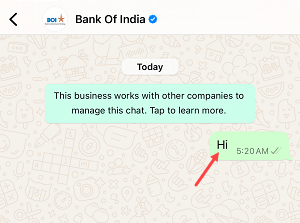
Once you’ve saved the number, it’s time to start the conversation and activate the banking services.
- Action: Open WhatsApp and find “BOI WhatsApp Banking” in your contacts. Send a “Hi” message to initiate the chat.
- Action: You will receive a welcome message outlining the features of WhatsApp Banking (Balance Inquiry, Hotlist Credit/Debit card, Loans, and more). To opt-in and proceed, reply with “YES” to this message.
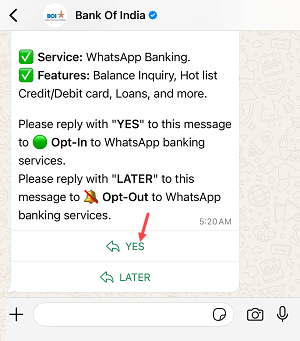
Step 3: Verify Your Identity with an OTP
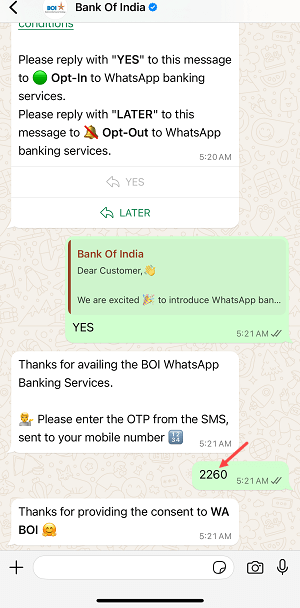
For security purposes, you will need to verify your identity using a One-Time Password (OTP).
- Action: After sending “YES,” Bank of India will send an OTP to your mobile number registered with your bank account via SMS. Enter this OTP into the WhatsApp chat.
Step 4: Access the Service Menu

Upon successful OTP verification, you will receive a confirmation message and be presented with the main service menu.
- Action: You’ll see a message “Thanks for providing the consent to WA BOI 😊” followed by “Welcome to BOI WhatsApp Banking Services 🏛️”. Below this, you’ll find options such as “Balance Enquiry,” “Mini Statement,” and “More Products.”
Step 5: Select “Mini Statement” to View Transactions
Now, to get your recent transaction history, select the appropriate option.
- Action: From the menu, click on the “Mini Statement” option.
Step 6: Receive Your Mini Statement Details
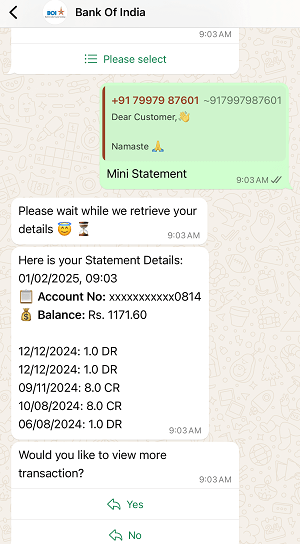
The system will then retrieve and display your mini statement.
- Action: The chat will show “Please wait while we retrieve your details 🧑💻⏳”. Shortly after, your mini statement will appear, including your masked account number (e.g., XXXXXXXXXX0814), current balance (e.g., Rs. 1171.60), and the last few debit (DR) and credit (CR) transactions with their respective dates and amounts.
Step 7: Explore More Transactions (Optional)
If you need to view more transactions beyond what’s initially displayed, you might have an option to do so.
- Action: You might see a prompt asking, “Would you like to view more transactions?” with “Yes” and “No” options. Select “Yes” if you wish to see an extended transaction history.
Other Useful Services on BOI WhatsApp Banking
Besides mini statements, BOI WhatsApp Banking offers other valuable features:
- Balance Enquiry: Simply select “Balance Enquiry” from the main menu to instantly check your current account balance.
- Hotlisting Credit/Debit Card: Quickly block your credit or debit card in case of loss or theft.
- Loans: Get information related to various loan products.
- More Products: Explore other banking products and services offered by BOI.
Conclusion
Bank of India’s WhatsApp Banking service is very useful to get your account details and transaction info in just one click on the WhatsApp App without login to mobile banking or net banking. If you want to know your account info ungently and online banking is not vaiable, simply open WhatsApp and send Hi to get your Bank of India account details.
