
Keeping your contact information updated with your bank is crucial for receiving important security alerts, transaction notifications, and monthly statements. For Bank of India (BOI) customers, changing or updating your registered email ID no longer requires a trip to the branch. Thanks to the secure and efficient BOI Net Banking platform, you can update your email address instantly from the comfort of your home.
This comprehensive, step-by-step guide will walk you through the entire online process for updating your Bank of India email ID. Whether you’ve switched providers, want to consolidate your accounts, or simply need to correct a typo, using BOI’s Net Banking service ensures a seamless and authenticated change. Update your details today to ensure uninterrupted communication regarding your bank accounts and services.
Simple Steps to Update Your BOI Email ID via Net Banking
Changing your email ID online is a secure and swift process that utilizes dual-factor authentication (OTP to your new email and OTP to your registered mobile number) to ensure the safety of your personal data.
To begin the process, ensure you have your BOI Net Banking login credentials ready and access to both your registered mobile number and the new email address you wish to update.
1. Visit the Official BOI Website and Log In:
- Go to the Bank of India’s official website.
- Click on “Internet Banking” (usually located in the top-right corner).
- Select the “Omni Neo Retail Login” option.
- Enter your User ID and Password to log into your BOI Net Banking dashboard.
2. Access Your Profile Details:

-
- After successfully logging in, click on your Profile Picture or Name (usually in the top right corner).
- From the dropdown menu, select the “My Personal & Account Details” option.
2. Initiate the Email Update:

- Your profile page will display your personal details, including the currently registered Email ID.
- Find the Email field and click the “Edit” (pencil) button next to it to add a new email address.
3. Enter and Verify Your New Email ID:

- A pop-up window titled “Enter New Email ID” will appear. Enter your new email address that you wish to update to.
- An OTP (One-Time Password) will be immediately sent to this new email ID. Enter the OTP in the verification box and click “Verify OTP”.

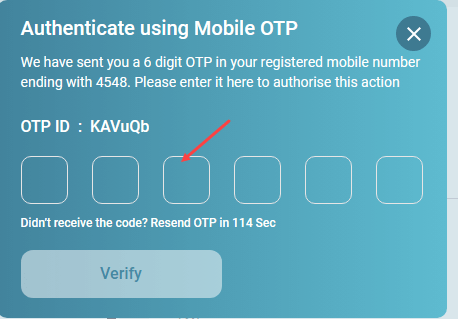
4. Authenticate with Mobile OTP:
-
- For security purposes, you will receive a second OTP. This one is sent to your registered Mobile Number.
- Enter the Mobile OTP to authenticate the change and click “Verify”.
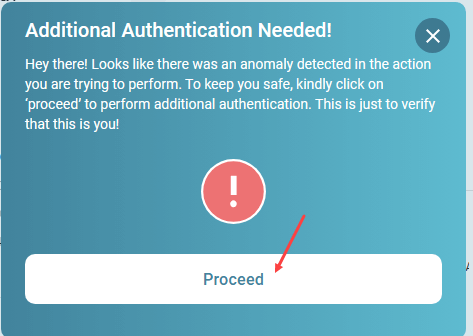
5. Finalize the Update:
-
- A final “Additional Authentication Needed” prompt may appear. Click on the “Proceed” button.
- A third and final OTP will be sent to your old/existing registered email ID for final confirmation. Enter this OTP.

Confirmation:
-
- Once all OTPs are verified, you will see a message: “Email ID successfully updated!”

Secure and Convenient Banking at Your Fingertips
Updating your crucial contact details like your email ID is no longer a tedious process. Bank of India’s seamless online platform simplifies this task, ensuring your account is always linked to your current and preferred email address for essential banking communication, statements, and security alerts. By utilizing Net Banking, you maintain control over your personal data with the highest level of security authentication.
Frequently Asked Questions (FAQ)
Q1. Do I need to visit a BOI branch to change my email ID?
A1. No, you can change or update your Bank of India email ID completely online using the BOI Net Banking portal, as detailed in the steps above.
Q2. How long does it take for the new email ID to be updated?
A2. The update is generally instant after the final authentication step is completed online. You will receive immediate confirmation on your screen.
Q3. What if I do not have access to my old email ID?
A3. Since the final step requires an OTP to the old email ID, if you completely lack access, you will need to submit a request at your nearest Bank of India branch to update the detail manually.
Q4. Is there a charge for updating the email ID through Net Banking?
A4. No, the service to update your email ID and other personal details through Bank of India Net Banking is completely free of charge.
