
Transferring funds online through NEFT (National Electronic Funds Transfer) is a secure and widely used method provided by SBI (State Bank of India). Whether you want to send money to a friend, pay bills, or settle dues with another bank account, SBI’s internet banking platform makes it easy.
This guide explains how to do NEFT money transfer from an SBI account to another bank account using SBI Net Banking. It includes every step shown in the actual transaction process, ensuring even beginners can follow along smoothly.
Table of Contents
What is NEFT Transfer?
NEFT is a nationwide payment system that enables the electronic transfer of funds from one bank account to another. Using SBI internet banking, you can send NEFT payments at any time of day or night, as NEFT is now operational 24×7. There are no fixed limits for NEFT, although certain internal SBI caps may apply depending on your account type and KYC status.
When you send money through NEFT, the money will be credited to the beneficiary bank account within an hour.
This article outlines the complete NEFT transfer process from login to confirmation, including beneficiary selection, amount entry, and OTP verification.
Step-by-Step Guide to Do NEFT Transfer from SBI to Other Bank Account
Step 1: Log in to SBI Net Banking
-
Visit the official SBI online banking website: https://www.onlinesbi.sbi.
-
Enter your username and password to access your account dashboard.
Step 2: Navigate to ‘Payments / Transfers’
-
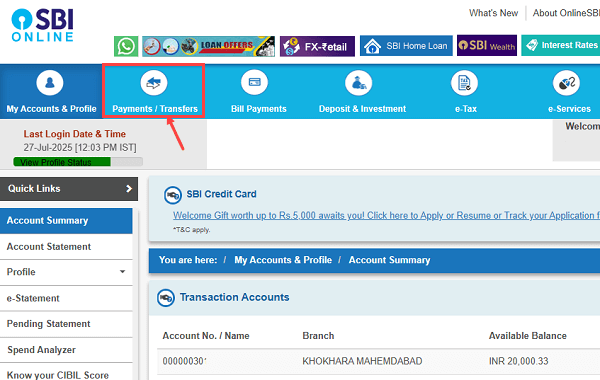
On the top menu bar of the SBI dashboard, click on “Payments / Transfers”.
-
This section provides access to all types of fund transfers, both within SBI and to other banks.
Step 3: Choose ‘Other Bank Transfer’
-
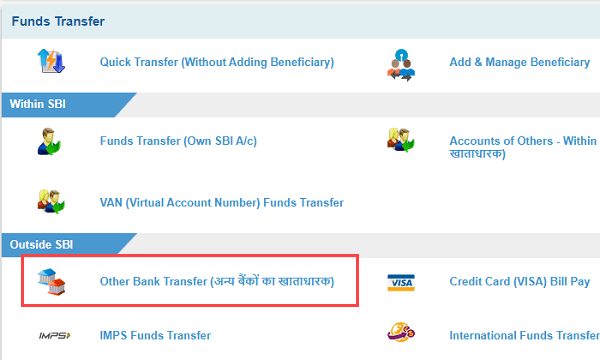
Under the “Outside SBI” category, select the option labeled “Other Bank Transfer (अन्य बैंक के खाताधारक)”.
-
This option is used to send money to any non-SBI bank account via NEFT, RTGS, or IMPS.
Step 4: Select ‘NEFT’ as the Payment Mode
-
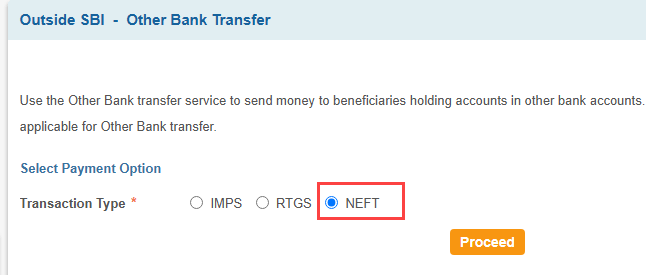
You’ll be asked to choose the transaction type. Select “NEFT” from the given list (which may also include RTGS and IMPS).
-
Click on the “Proceed” button to continue.
Step 5: Select the Debit Account
-
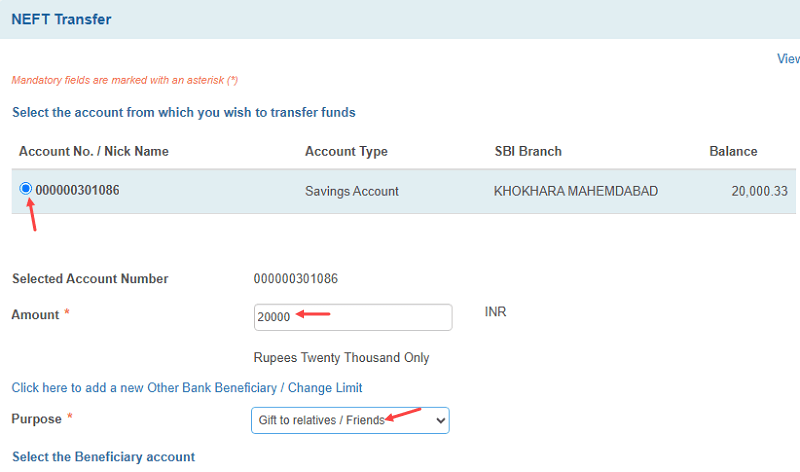
You will now see a list of your linked SBI accounts. Choose the account number you want to transfer money from by selecting the radio button next to it.
-
Enter the exact amount you want to transfer.
-
Select a purpose for the transaction from the dropdown list (e.g., “Gift to relatives / Friends”, “Education”, “Salary”, etc.).
Step 6: Choose the Beneficiary
-
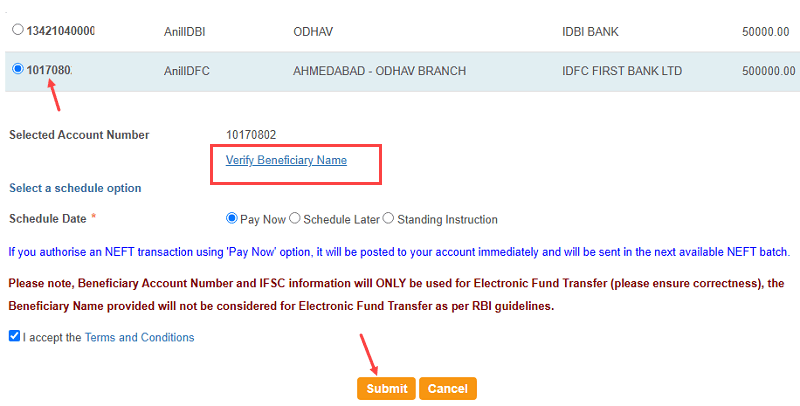
You’ll see a list of saved beneficiaries for external bank transfers. Select the correct beneficiary name and corresponding account number.
-
Choose Pay Now for immediate transfer
-
Check the box to accept the Terms and Conditions. Click on the “Submit” button to move forward.
Step 9: Review and Confirm Details
-
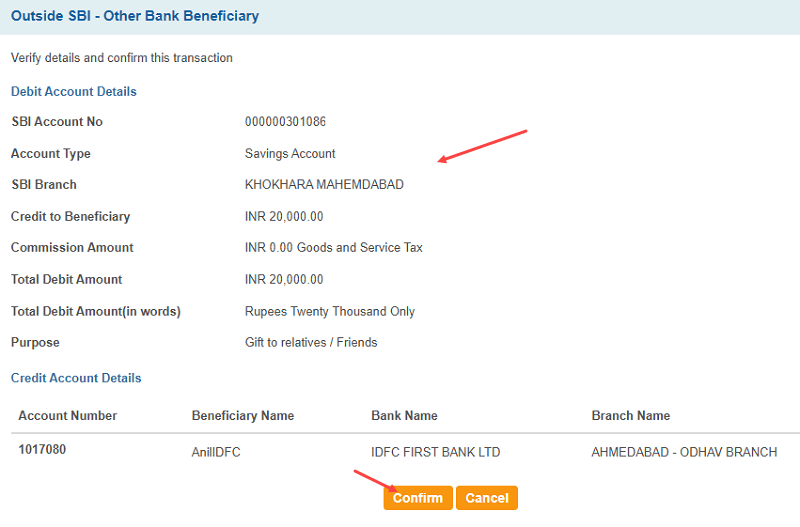
A confirmation page will appear showing:
-
Your debit account details (account number, branch)
-
Beneficiary account details (name, bank, branch, account number)
-
Amount and purpose
-
Total amount to be debited
-
-
Review all the details carefully.
-
Click on the “Confirm” button to proceed.
Step 10: Enter High-Security Password (OTP)
-
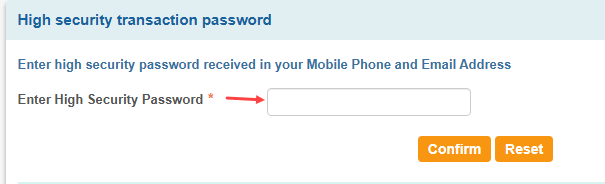
An OTP (One-Time Password) will be sent to your registered mobile number and email ID.
-
Enter this high-security password in the field provided.
-
Click “Confirm” again to authorize the transaction.
Step 11: Transaction Successful
-
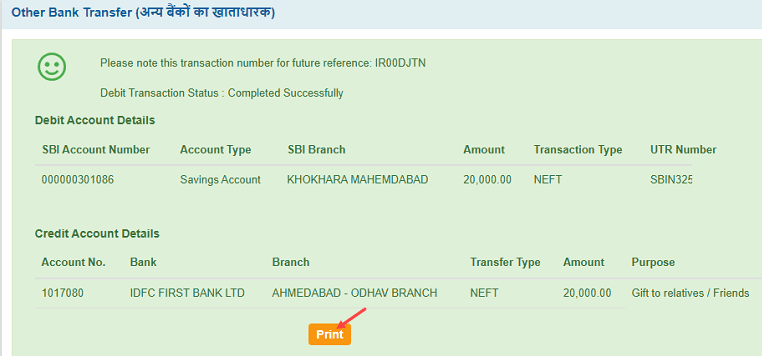
After successful verification, you will see a confirmation page with:
-
Transaction Reference Number (e.g., IR00DJTN)
-
Debit status: Completed Successfully
-
Transaction Type: NEFT
-
UTR Number (for tracking)
-
Option to print the transaction receipt
-
-
This completes the NEFT transfer process.
Please Note
-
Always verify the beneficiary details before submitting a transaction.
-
Use the “Verify Beneficiary” option when available to confirm the correctness of name and bank.
-
Save the UTR number or download the transaction receipt for future reference.
-
NEFT transfers can take up to 30 minutes, depending on the batch timing, though most are processed quickly.
Conclusion
Using the SBI net banking portal for NEFT transfers is one of the safest and most convenient ways to send money to another bank account. By following this step-by-step process, you can complete your transaction without any confusion or delays.
