
In today’s fast-paced digital era, mobile banking has revolutionized the way we manage our finances. No more waiting in long queues or dealing with tedious paperwork—everything is just a tap away. Indian Bank, a leader in embracing technology, offers its customers the IndSMART mobile banking app, a secure, all-in-one platform for a wide range of financial services.
One of the most convenient features is the ability to apply for a new Indian Bank ATM/Debit Card online without visiting a branch. In this detailed guide, we’ll walk you through the Indian Bank Debit Card Application IndSMART App process step-by-step so you can get your new card quickly and safely.
Table of Contents
Step-by-Step Guide to Apply for an Indian Bank Debit Card via IndSMART App
Before starting, ensure you have:
- The IndSMART app installed and activated
- Your MPIN (login PIN) and Transaction PIN
- An active registered mobile number to receive OTPs
Step 1: Launch the IndSMART App and Log In
Open the IndSMART mobile banking app on your smartphone. Use your 4-digit MPIN or biometric authentication (Face ID/Fingerprint) to log in securely.
Step 2: Access the Main Menu
Once inside the dashboard, tap the hamburger menu icon (three horizontal lines) in the top-left corner.

Step 3: Navigate to ‘Service Request’
From the side menu, scroll down and select Service Request to view various account-related services.

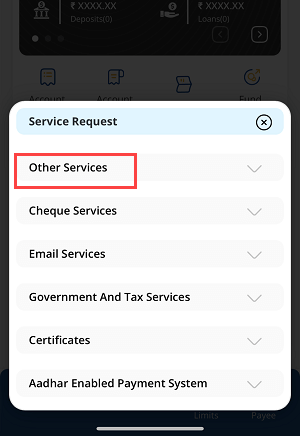
Step 4: Go to ‘Other Services’
Inside Service Request, select Other Services to explore more banking options.
Step 5: Select ‘Apply for New Debit Card’
Scroll until you find Apply for New Debit Card and tap to start the application.

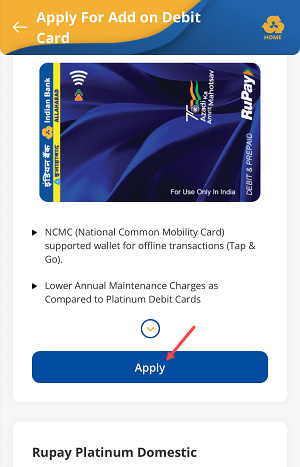
Step 6: Choose Your Debit Card Type
You’ll see available options, such as Rupay Classic Contactless Card. Select your preferred card type and tap Apply.
Step 7: Select the Account
Choose the savings account you want the debit card linked to.

Step 8: Review Your Details
Check the pre-filled form for accuracy (name, account, and card type). Tap Continue.

Step 9: Confirm Your Request
A pop-up will show your application summary. Tap Confirm if all details are correct.

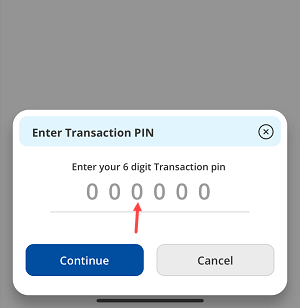
Step 10: Enter Transaction PIN
Input your 6-digit Transaction PIN to proceed.
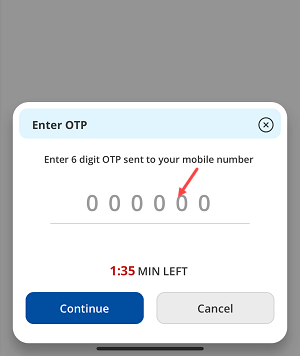
Step 11: Authenticate with OTP
Enter the One-Time Password (OTP) sent to your registered mobile number and tap Continue.
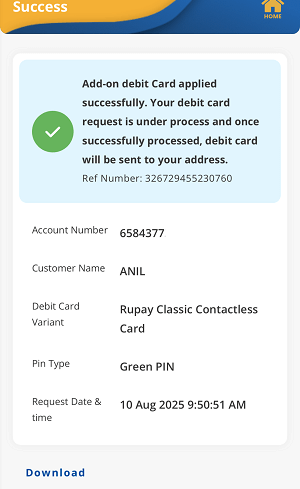
Step 12: Application Successful
You’ll see a confirmation message: “Add-on Debit Card applied successfully” with a reference number. Your new debit card will arrive at your registered address within 15 working days.
After You Receive Your Card – Generate Your Green PIN
Once your debit card arrives, use the Green PIN feature in the IndSMART app to set your ATM PIN instantly. This eliminates the need for physical PIN mailers, making the process faster and more secure.
FAQs – Indian Bank Debit Card Application IndSMART App
Q1: What are the prerequisites for applying online?
You need the IndSMART app, an active savings account, MPIN, Transaction PIN, and an active registered mobile number.
Q2: How long will my debit card take to arrive?
Typically, 10–15 working days.
Q3: Is it safe to apply via the IndSMART app?
Yes. It’s secured with MPIN, Transaction PIN, and OTP authentication.
Q4: Can I choose my card type?
Yes, during Step 6 you can select from available card variants.
Q5: What is a Green PIN?
It’s a digital PIN generation process through the app, faster and more secure than traditional methods.
Q6: Can I track my debit card application status?
Yes, you can contact Indian Bank customer support with your reference number.
Conclusion
Applying for a new Indian Bank Debit Card via the IndSMART app is a simple, safe, and time-saving process. With just a few taps, you can request a card and even generate your Green PIN without visiting a branch. Embracing digital banking not only saves time but also enhances security and convenience.
