
Linking your Aadhaar card with your IRCTC account is essential for hassle-free Tatkal ticket booking on Indian Railways. This step-by-step guide will walk you through the process using the IRCTC Rail Connect mobile app, ensuring a secure and streamlined experience. Follow these simple steps to link your Aadhaar card and book Tatkal tickets with ease.
Table of Contents
Why Link Aadhaar with IRCTC for Tatkal Booking?
- Mandatory Verification: Aadhaar linking is required for Tatkal bookings to verify passenger identity.
- Faster Booking Process: Pre-verified details speed up the Tatkal booking window.
- Enhanced Security: Reduces fraudulent bookings and ensures transparency.
Prerequisites
Before starting, ensure you have:
- The IRCTC Rail Connect mobile app is installed.
- An active IRCTC account.
- Your 12-digit Aadhaar number or 16-digit Virtual ID (VID).
- Access to the mobile number linked with your Aadhaar for OTP verification.
- A stable internet connection.
Step-by-Step Guide to Link Aadhaar Card with IRCTC Account
Step 1: Open the IRCTC Rail Connect App and Log In
- Launch the IRCTC Rail Connect mobile application on your smartphone.
- Log in to your IRCTC account using your registered username and password.
- If you don’t have an account, tap “Register” to create one.
Step 2: Access the Account Section
- After logging in, locate and tap the Account section in the app. This is typically found in the menu or bottom navigation bar (refer to the app’s interface for exact placement).

Step 3: Select the Authenticate User Option
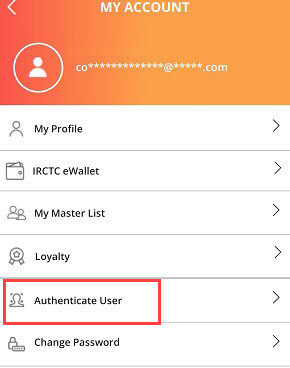
- In the Account section, find and tap the Authenticate User option to begin the Aadhaar linking process.
Step 4: Choose Aadhaar Card/VID Authentication
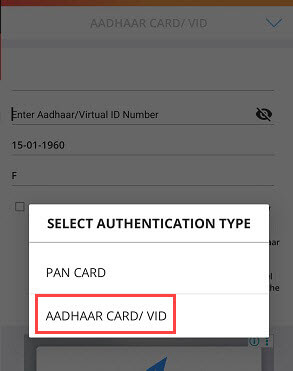
- Tap on the Select Authentication Type option.
- From the dropdown or list, choose Aadhaar Card/VID as your authentication method.
Step 5: Enter Aadhaar Number or VID
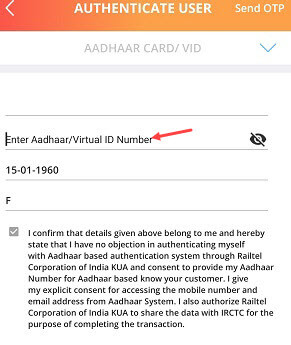
- Input your 12-digit Aadhaar number or 16-digit Virtual ID (VID) in the provided field.
- Double-check the number for accuracy to avoid errors.
- Tap the Send OTP button to proceed.
Step 6: Verify with OTP
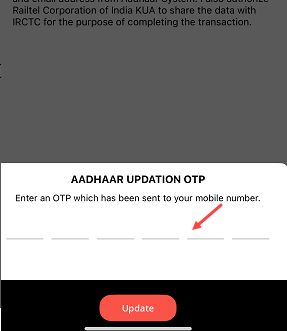
- You will receive a one-time password (OTP) on the mobile number linked to your Aadhaar.
- Enter the OTP in the designated field and tap Submit.
- Upon successful verification, your IRCTC account will be linked with your Aadhaar card.
Confirmation

- Once the OTP is verified, you’ll receive a confirmation message in the app indicating that your Aadhaar is successfully linked.
- Your IRCTC account is now ready for Tatkal ticket booking without any issues.
Tips for Smooth Tatkal Booking
- Link Aadhaar Early: Complete the linking process well before the Tatkal booking window (10 AM for AC classes, 11 AM for non-AC classes, one day prior to travel).
- Add Passengers: Use the “Master List” in the IRCTC app to add and verify Aadhaar details for frequent travelers.
- Ensure OTP Delivery: Keep your Aadhaar-linked mobile number active to receive OTPs.
- Stable Connection: Use a reliable internet connection to avoid disruptions during booking.
Common Issues and Solutions
- OTP Not Received: Verify that the mobile number linked to your Aadhaar is active. Request a new OTP or update your Aadhaar details via the UIDAI website.
- Incorrect Aadhaar Details: Ensure the Aadhaar number or VID entered matches your records. Re-enter if needed.
- App Errors: Restart the app, clear the cache, or update to the latest version of the IRCTC Rail Connect app.
- Name mismatch: Go to IRCTC Profile section and edit your name as per Aadhaar then try
FAQs
1. Is Aadhaar linking mandatory for Tatkal bookings?
Yes, IRCTC requires Aadhaar verification for at least one passenger per Tatkal booking.
2. Can I use VID instead of my Aadhaar number?
Yes, you can use your 16-digit Virtual ID (VID) for linking, as it provides an additional layer of privacy.
3. What if my mobile number is not linked to Aadhaar?
Visit an Aadhaar enrollment center or the UIDAI website to update your mobile number before proceeding.
4. Can I link multiple Aadhaar numbers to my IRCTC account?
Yes, you can add multiple passengers’ Aadhaar details to your IRCTC Master List for Tatkal bookings.
Conclusion
Linking your Aadhaar card with your IRCTC account via the IRCTC Rail Connect app is a quick and straightforward process. By following these steps, you can ensure a seamless Tatkal booking experience, saving time and avoiding last-minute hassles. Link your Aadhaar today and book your Tatkal tickets worry-free!
