
Ever needed your credit card number or CVV for an online purchase but didn’t have your physical card with you? ICICI Bank provides a secure and easy way to access all your credit card details, including the full card number, expiry date, and CVV, right from your mobile phone or computer.
This comprehensive guide will show you exactly how to view your virtual credit card on both the iMobile app and the Net Banking portal, ensuring you’re always ready to transact.
Table of Contents
Check Your ICICI Credit Card Details on the iMobile App
The iMobile Pay app is the quickest way to access your card details on the go.
Step 1: Log in to the iMobile Pay App
First, open the ICICI iMobile Pay app on your smartphone. Log in securely using your fingerprint, Face ID, or your 4-digit login PIN.
Step 2: Navigate to ‘Cards & Forex’
On the app’s home screen, locate and tap on the “Cards & Forex” option. This section manages all your credit and debit cards.

Step 3: Select Your Credit Card
You will see a list of all your linked ICICI Bank cards. Tap on the specific credit card for which you need to view the details.
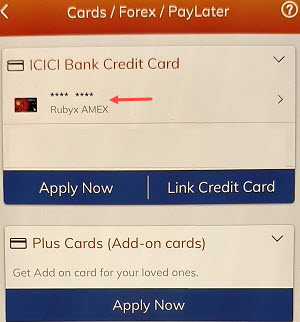
Step 4: View Your Virtual Card Details
On the card summary page, look for an option that says “View Card” or a similar button, which may be located below your credit card’s image.

Step 5: Authenticate for Security
To protect your sensitive information, the app will ask you to authenticate. Enter your 4-digit MPIN or the One-Time Password (OTP) sent to your registered mobile number.
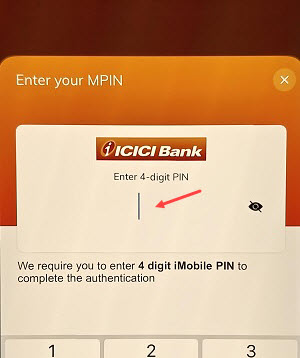
Once authenticated, the screen will display your complete 16-digit card number and expiry date.

To view your credit card CVV number, just turn ON CVV button as you can see in the below screenshot.

View your ICICI Credit Card Details Through ICICI Net Banking
For those who prefer a desktop or browser interface, Net Banking is a reliable alternative.
Step 1: Log in to ICICI Bank Net Banking
Visit the official ICICI Bank website and log in to your Net Banking account using your User ID and Password.
Step 2: Go to the ‘Credit Cards’ Section
After logging in, navigate to the “Cards – Credit Cards” tab, which is usually found in the main menu.

Step 3: Select Your Card and Manage Services
You can see that currently your credit card details are hidden. To view your card details, just click on the eye button as you can see screenshot below.

Step 4: Choose Verification Method
Select Call, SMS or email any option to receive OTP for authentication.

Step 5: Complete Authentication
For security, you will be prompted to enter your transaction password or an OTP sent to your registered mobile number.

Step 6: View your Credit card Details
Now you can check your credit card number. To view the CVV and expiry date just click on the eye button.

FAQs on Checking ICICI Credit Card Details
Q1: Is it safe to check my credit card details online? A: Yes, it is completely safe. ICICI Bank’s iMobile app and Net Banking portal are equipped with multiple layers of security, including multi-factor authentication, to ensure that your sensitive data is accessible only to you.
Q2: What details are visible on the virtual credit card? A: The virtual credit card displayed online contains all the information required for online transactions, including the 16-digit card number, the expiry date (MM/YY), and the 3-digit CVV.
Q3: Can I get my credit card number without having a Net Banking or iMobile account? A: You need to be registered for either Net Banking or the iMobile app to access your virtual card details. If you are not registered, you can easily do so using your credit card information.
Q4: What should I do if my physical card is lost or stolen? A: The first and most crucial step is to block your physical card immediately. You can do this easily through the iMobile app or Net Banking. Once blocked, you can request a replacement card.
By leveraging these secure digital platforms, you can manage your ICICI credit card with confidence and make payments smoothly without relying on your physical card.
